
VPS Tutorials
2024 Updated Collection of Common VPS Testing Tools
This article presents the latest commonly used VPS script tools in 2024, making it easy for users to quickly find the scripts they need for testing, including one-click benchmarks, comprehensive tests, IP quality/unblocking, bandwidth tests, route tracing, latency/packet loss tests, operations toolkits, system reinstall scripts, and more.
A collection of the latest commonly used VPS script tools in 2024, making it easy to quickly find them when needed, including VPS testing scripts (one-click benchmarks, comprehensive tests, IP quality/unblocking, bandwidth tests, route tracing, latency/packet loss tests), operations toolkits, DD system reinstall scripts, and more. Updates or invalid scripts will be added and modified periodically.
Nlbench.sh official version:
A host aggregation benchmark script provided by NodeLoc to all users. It can automatically run Yabs, the fusion monster (ecs), IP quality, streaming unblocking, three-network speed tests, iperf3, return route, and other benchmarks on a host with one click. After the benchmark finishes, the results will be saved as a MarkDown file. Github project address: https://github.com/everett7623/nodeloc_vps_test 113
wget -O Nlbench.sh https://raw.githubusercontent.com/everett7623/nodeloc_vps_test/main/Nlbench.sh && chmod +x Nlbench.sh && ./Nlbench.sh
Fusion monster (ecs):
curl -L https://gitlab.com/spiritysdx/za/-/raw/main/ecs.sh -o ecs.sh && chmod +x ecs.sh && bash ecs.sh
or
bash <(wget -qO- bash.spiritlhl.net/ecs)
Fusion monster GO version (for Linux/FreeBSD/MacOS):
Project address: GitHub - oneclickvirt/ecs: VPS fusion monster server benchmark script - GO refactored version 37
curl -L https://raw.githubusercontent.com/oneclickvirt/ecs/master/goecs.sh -o goecs.sh && chmod +x goecs.sh && bash goecs.sh env && bash goecs.sh install && goecs
or
curl -L https://cdn.spiritlhl.net/https://raw.githubusercontent.com/oneclickvirt/ecs/master/goecs.sh -o goecs.sh && chmod +x goecs.sh && bash goecs.sh env && bash goecs.sh install && goecs
LemonBench:
Checks basic VPS information, network, streaming unblocking, routes, and more.
wget -qO- https://raw.githubusercontent.com/LemonBench/LemonBench/main/LemonBench.sh | bash -s -- --fast
UnixBench.sh: A work by the expert Qiushui Yibing. The main test items of Unixbench include: system calls, read/write, processes, graphical tests, 2D, 3D, pipes, operations, C library, and other system benchmark performance test data.
wget --no-check-certificate https://github.com/teddysun/across/raw/master/unixbench.sh && chmod +x unixbench.sh && ./unixbench.sh

Bench network bandwidth and disk read/write speed: some overseas nodes + some domestic nodes)
wget -qO- bench.sh | bash
SuperBench.sh network bandwidth and disk read/write speed: The SuperBench script is based on the bench.sh script by the expert Oldking, which itself was based on the script by teddysun, and adds features such as dedicated server power-on time detection, server virtualization architecture, TCP congestion control, and more.
wget -qO- --no-check-certificate https://raw.githubusercontent.com/oooldking/script/master/superbench.sh | bash
YABS performance test script: A relatively comprehensive script that can be used to test multiple aspects of VPS performance, including configuration information, disk IO tests, network bandwidth tests, and Geekbench tests.
curl -sL yabs.sh | bash
Geekbench 5 dedicated test script:
bash <(curl -sL gb5.top)
IP quality detection:
bash <(curl -Ls IP.Check.Place)
or
bash <(wget -qO- bash.spiritlhl.net/ecs-ipcheck)
Streaming unblocking:
bash <(curl -L -s media.ispvps.com)
or
bash <(curl -L -s check.unlock.media)
or
bash <(curl -Ls unlock.icmp.ing/scripts/test.sh)
OpenAI unblocking detection:
bash <(curl -Ls https://github.com/ludashi2020/OpenAI-Checker/raw/main/openai.sh)
Hyperspeed three-network speed test:
bash <(curl -Lso- https://bench.im/hyperspeed)
Comprehensive speed test script nws.sh:
curl -sL nws.sh | bash
Multi-function self-updating speed test script: three networks, including multi-threaded, single-threaded, and other speed tests
bash <(curl -sL bash.icu/speedtest)
DD disk test, generate a 5G file, sequential
dd if=/dev/zero of=5gb bs=1M count=5120
Generate a 5G file, random
dd if=/dev/urandom of=5gb bs=1M count=5120
HTTP single-threaded download test
Start a simple http service
python3 -m http.server
Download directly with a browser or other tools
Browsers such as Edge are recommended
You can also try IDM download
Replace yourip below with your IP address
wget http://yourip:8000/5gb
Delete files on the server side:
rm 5gb
AutoTrace return route:
wget -N --no-check-certificate https://raw.githubusercontent.com/Chennhaoo/Shell_Bash/master/AutoTrace.sh && chmod +x AutoTrace.sh && bash AutoTrace.sh
BestTrace return route:
After entering, run a one-click test for the three networks of Beijing, Shanghai, and Guangzhou
wget -qO- git.io/besttrace | bash
BackTrace return route:
curl https://raw.githubusercontent.com/zhanghanyun/backtrace/main/install.sh -sSf | sh
NextTrace return route:
curl nxtrace.org/nt |bash
OpenTrace return route:
OpenTrace is the cross-platform GUI interface of NextTrace, bringing you a familiar but more powerful user experience.
https://github.com/Archeb/opentrace 12
Pingsx MTR return route:
https://ping.sx/mtr 5
Outbound route:
https://www.itdog.cn/traceroute/ 6
https://tools.ipip.net/traceroute.php 1
Google/Facebook/X/Youtube/Netflix/Chatgpt/Github latency
bash <(curl -sL https://nodebench.mereith.com/scripts/curltime.sh)
Ping.pe
Global latency, packet loss
https://ping.pe 19
Pingsx Ping
Online Ping, Port, DNS, MTR and other tests
https://ping.sx 8
Itdog Ping
https://www.itdog.cn/ping/ 9
vps_scripts:
wget -O vps_scripts.sh https://raw.githubusercontent.com/everett7623/vps_scripts/main/vps_scripts.sh && chmod +x vps_scripts.sh && ./vps_scripts.sh
Keji lion one-click script tool:
curl -sS -O https://raw.githubusercontent.com/kejilion/sh/main/kejilion.sh && chmod +x kejilion.sh && ./kejilion.sh
VPS one-click script toolbox:
curl -fsSL https://raw.githubusercontent.com/eooce/ssh_tool/main/ssh_tool.sh -o ssh_tool.sh && chmod +x ssh_tool.sh && ./ssh_tool.sh
BlueSkyXN comprehensive toolbox:
wget -O box.sh https://raw.githubusercontent.com/BlueSkyXN/SKY-BOX/main/box.sh && chmod +x box.sh && clear && ./box.sh
jcnf common script toolkit:
wget -O jcnfbox.sh https://raw.githubusercontent.com/Netflixxp/jcnf-box/main/jcnfbox.sh && chmod +x jcnfbox.sh && clear && ./jcnfbox.sh
Sm1rkBoy’s one-click script:
bash <(curl -Ls https://raw.githubusercontent.com/Sm1rkBoy/monitor_config/main/install.sh)
Lightweight VPS test collection:
bash <(curl -Ls resource.yserver.ink/all.sh) --custom
one-click-installation-script one-click repair and installation scripts (various scripts), go to GitHub to find what you need https://github.com/spiritLHLS/one-click-installation-script 17
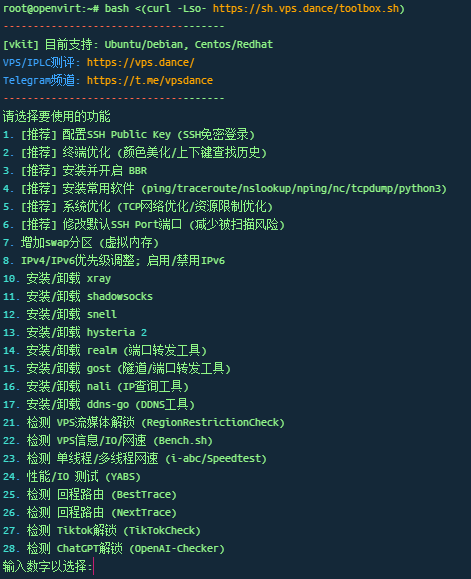
VPS ToolBox:
bash <(curl -Lso- https://sh.vps.dance/toolbox.sh)
Nekoneko - Linux network optimization:
bash <(curl -Lso- http://sh.nekoneko.cloud/tools.sh)
The default system is debian12
leitbogioro's script (recommended):
wget --no-check-certificate -qO InstallNET.sh 'https://raw.githubusercontent.com/leitbogioro/Tools/master/Linux_reinstall/InstallNET.sh' && chmod a+x InstallNET.sh && bash InstallNET.sh -debian 12 -pwd '密码'
beta.gs's script:
bash <(wget --no-check-certificate -qO- 'https://raw.githubusercontent.com/MoeClub/Note/master/InstallNET.sh') -d 12 -v 64 -p 密码 -port 端口 -a -firmware
beta.gs:
wget --no-check-certificate -O NewReinstall.sh https://raw.githubusercontent.com/fcurrk/reinstall/master/NewReinstall.sh && chmod a+x NewReinstall.sh && bash NewReinstall.sh
Nekoneko - DD one-click script:
bash <(curl -Lso- http://sh.nekoneko.cloud/DD/AutoReinstall.sh)